 themobile
Universal Mobile Display Compatibility List: Find Displays That Fit Multiple Phone Models
Looking for a universal mobile display compatibility list? If you run a mobile shop or repair centre, finding which phones use the same replacement display can help you identify suitable parts, manage stock and avoid unnecessary purchases.
TheMobileFit helps you find mobile phone models that share the same display assembly. Search by phone model or device code to check the compatible models listed in the database.
Instead of checking every phone manually, use the display compatibility finder to identify possible matches across supported brands.
Find compatible mobile displays
Search your phone model or device code in TheMobileFit to see the compatible display models available in the catalogue.

One assembly, several phones
What Is a Universal Mobile Display Compatibility List?
A universal mobile display compatibility list groups phone models that use the same replacement display assembly. Depending on the part and the recorded compatibility, one display may fit several models, including phones from different brands.
For example, a mobile repair shop may receive a phone for a display replacement. The exact display sold under that phone's name may not be available in the shop. A compatibility list can help the technician check whether another display stocked under a different model name is listed for the same assembly.
Display lists by brand: the mobile display compatibility list
This is useful when working with:
- LCD and touchscreen replacement assemblies.
- Display folders or combo displays.
- Compatible displays shared across phone models.
- Replacement parts identified by a device or model code.
Compatibility depends on the actual assembly, not just the phone's screen size or brand. Always verify the part before installation.
From the live finder
Mobile Display Compatibility Examples
The following examples illustrate how display compatibility groups can help shop owners identify replacement options. Check the live finder for the current model list and any available device codes.
-
01
Vivo Y20 display compatibility
TheMobileFit's catalogue lists a display group associated with the iQOO U1x display that includes multiple Vivo models, including the Vivo Y20. The group lists 29 phones in total: the IQOO U1X and 28 Vivo models, under 21 device codes.
For a shop owner, this means the search can reveal other models to check when looking for a display for a compatible phone. Confirm the exact model and assembly before using a replacement.
What to check: Search the phone model under the Display tab and review the complete compatibility group.
Check Vivo Display Compatibility Every Vivo display group
Open in the finder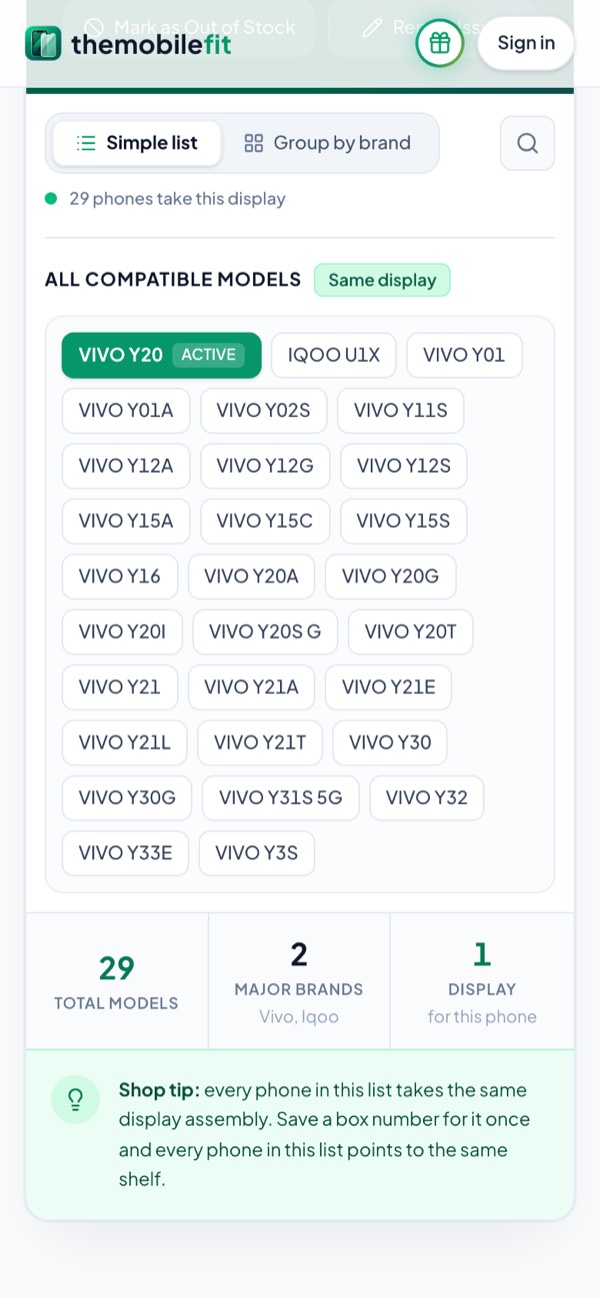
29 phones take the VIVO Y20's display. -
02
Samsung A71 display compatibility
TheMobileFit's existing compatibility information lists the Samsung A71, Samsung F62 and Samsung M51 in the same display group.
If you have one of these phones for repair, use the finder to check the listed assembly before selecting a replacement. Do not assume that other Samsung models with similar screen sizes will fit.
What to check: Search the exact phone model and confirm that the replacement display belongs to the listed group.
Check Samsung Display Compatibility Every Samsung display group
Open in the finder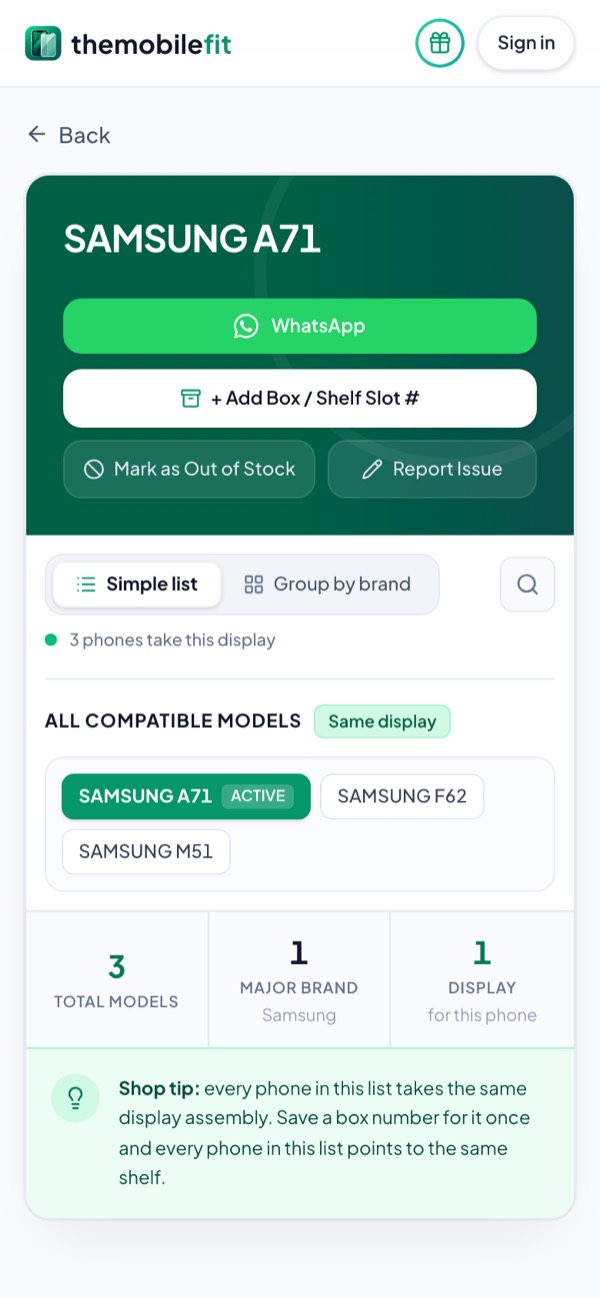
The SAMSUNG A71, F62 and M51: one display. -
03
Search by display model code
Sometimes the model name is not enough to identify a replacement part. Device codes can help narrow the search.
For example, TheMobileFit's existing guides demonstrate searching with codes such as CPH2359 and SM-A715F. On the Display tab, the code V2027 opens the same 29-phone group as the VIVO Y20.
What to check: If you have a device code, enter it in the display finder and review the compatible models returned. Make sure the code matches the phone or part you are checking.
Open in the finder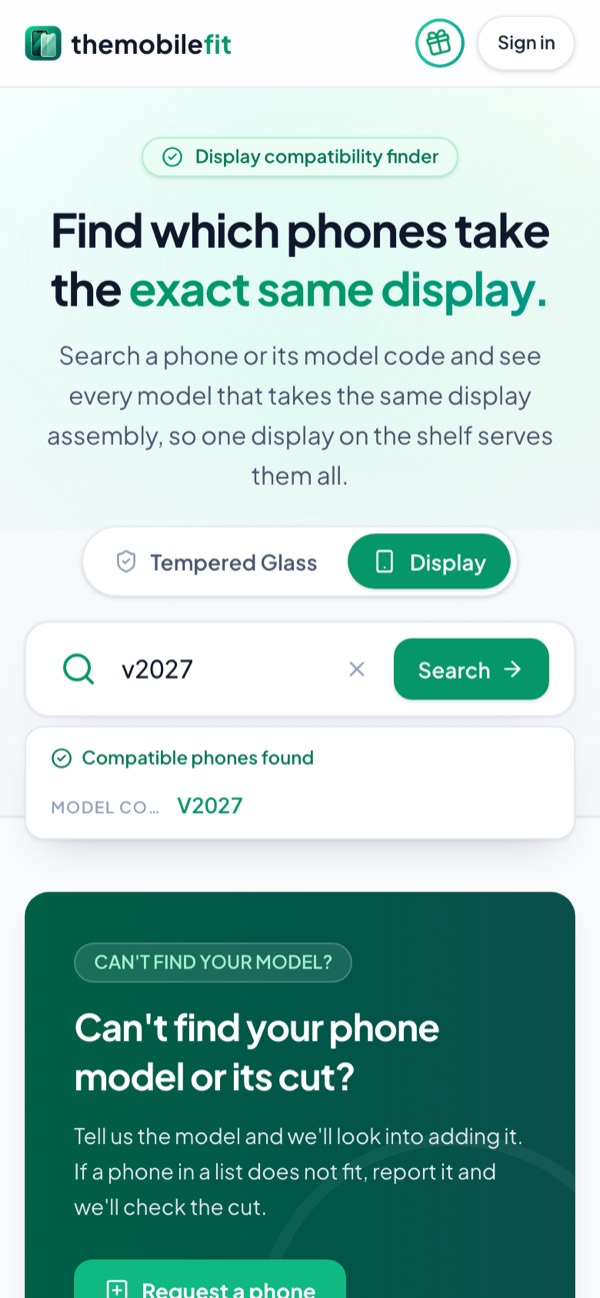
“v2027” is found as a model code.


Important: These examples are catalogue references, not a guarantee that every display sold under a similar name will fit. Check the current compatibility results before ordering or fitting a part.
5 steps
How to Find Compatible Mobile Display Models
Use TheMobileFit to check which phone models are listed for the same display assembly.
-
01
Open the display compatibility finder
Open TheMobileFit and select the Display option. Make sure you are searching for a display rather than tempered glass.
Display tab
Tempered Glass Display
-
02
Enter the phone model or device code
Type the phone's model name or supported device code into the search field. Use the full model name or code where possible to avoid confusing similar variants.
Name or code
- VIVO Y20
- V2027Code
Both open the same group.
-
03
Review the compatibility group
Check the results to see which other phone models are listed under the same display assembly. Review the available model names and device codes carefully.
Same display group
- IQOO U1X
- VIVO Y12S
- VIVO Y21
29 phones take this display
-
04
Check the physical replacement part
Before fitting or ordering a replacement, compare the original and replacement parts. Check the connector, frame, panel type, touch configuration and other relevant physical details.
Compare the parts
- Connector
- Frame
- Panel type
- Touch configuration
-
05
Save the result for your shop
If you use box or shelf references to organise your inventory, save the appropriate reference against the part where available. This can make it easier to locate the display when a compatible phone comes in for repair.
Box or shelf
- e.g. Box 12
One reference for every phone in the group.Basic
Find a compatible display for your next repair: Search your phone model or device code in TheMobileFit.
Open the Display Compatibility Finder See how TheMobileFit worksFor mobile shops
Why Mobile Shop Owners Need a Display Compatibility List
Mobile repair shops handle phones from several brands and model series. Remembering every display combination can be difficult, especially when suppliers label compatible assemblies differently.
A compatibility finder can help with everyday tasks.
-
Find replacement options
Check whether other models are listed under the same display assembly.
-
Reduce manual checking
Search a model or code instead of relying only on memory.
-
Organise display stockBasic
Keep track of compatible models and the box or shelf where a part is stored.
-
Support purchasing decisions
Check compatibility information before placing an order.
-
Handle multiple brands
Review the models returned by the finder, including cross-brand matches where available.
-
The compatibility information should be treated as a reference for identifying potential replacements. It does not replace physical checks or supplier confirmation.
Two different parts
Mobile Display Compatibility vs Tempered Glass Compatibility
A mobile display and a tempered glass screen protector are different parts. A phone may share its tempered glass with another model without using the same replacement display.
| What you are checking | Display compatibility | Tempered glass compatibility |
|---|---|---|
| Purpose | Find a replacement display assembly | Find a suitable screen protector |
| Main checks | Panel, connector, frame, touch configuration and assembly | Screen shape, dimensions, cutouts and coverage |
| Typical use | Mobile repair and display replacement | Accessory sales and screen protection |
| What to search | The phone model or display device code | The phone model or glass reference |
Choose the correct category in TheMobileFit before checking a match. A result under Tempered Glass should not be treated as proof that a display will fit, and vice versa.
Size is one specification
Can Phones With the Same Screen Size Use the Same Display?
Not always. Screen size is only one specification. Two phones with the same advertised screen size may use different panels, connectors, frames, camera layouts or touch configurations.
To identify a suitable replacement, search for the exact phone model or device code and check the display compatibility results. Verify the physical assembly before fitting it.
Same size, but check the
- Panel
- Connector
- Frame
- Camera layout
- Touch configuration
The exact model decides the display.
Answers
Frequently Asked Questions
What is a universal mobile display list?
A universal mobile display list groups phone models that are recorded as using the same replacement display assembly. It helps mobile shop owners and repair technicians identify possible replacement options across supported models.
How do I find which phones use the same display?
Search your phone model in TheMobileFit's Display finder. Review the compatibility group to see the other listed models. You can also search using a supported device code.
Can one mobile display fit multiple phone models?
Yes, some display assemblies are shared across multiple phone models. However, compatibility varies by assembly. Confirm that the exact models are listed together and check the replacement part before installation.
Can displays from different brands be compatible?
Some display compatibility groups include models from different brands. Do not assume cross-brand compatibility based on appearance or screen size alone. Check the exact models in the compatibility finder.
Can I use screen size to identify a compatible display?
Screen size can help narrow down options, but it is not enough to confirm compatibility. Panel type, connector, frame, touch configuration and other physical details also matter.
Can I search by a display model number or device code?
If the code is supported by TheMobileFit, you can enter it in the Display finder to check the available compatibility results. Confirm that the code corresponds to the exact phone or part you are working with.
Is a display compatibility list the same as a tempered glass list?
No. A display compatibility list identifies phones that share a replacement display assembly. A tempered glass list identifies phones that can use a particular screen protector. The two lists serve different purposes.
Does TheMobileFit provide a downloadable universal display PDF?
TheMobileFit provides online compatibility information through its finder. Use the live catalogue to check the available models and current compatibility groups rather than relying on a saved list that may not include later updates.
How can I avoid ordering the wrong display?
Search the exact model or device code, review the listed compatible models, and compare the original part with the replacement. Confirm connector, panel, frame and touch compatibility with your supplier when needed.
Who can use TheMobileFit?
TheMobileFit is designed for mobile shop owners, spare-parts sellers and repair technicians who need to check compatibility information for supported phone models.
Find the Right Display for Your Next Repair
When a customer brings in a phone for display replacement, start by checking its exact model or device code. TheMobileFit helps you review the compatible display models listed in its catalogue so you can make a more informed decision about replacement stock.
Search the model. Check the compatibility group. Verify the part before fitting.